The Ultimate Wedding Planning Checklist

Planning your dream wedding should be an exciting journey, not an overwhelming task. Our Ultimate Wedding Planning Checklist is a comprehensive, automated spreadsheet for Google Sheets and Excel designed to handle everything from budget tracking and guest lists to vendor management and honeymoon planning, ensuring you stay organized every step of the way to "I do."

The Ultimate Wedding Planning Checklist
Available Formats
Google Sheets Google Sheets
The Ultimate Wedding Planning Checklist

Unlock Stress-Free Wedding Planning

Congratulations on your engagement! To turn your vision into a reality without the hassle, we've created the most comprehensive wedding planning spreadsheet available. This tool keeps every detail at your fingertips, whether you are 12 months out or in the final week of preparations.
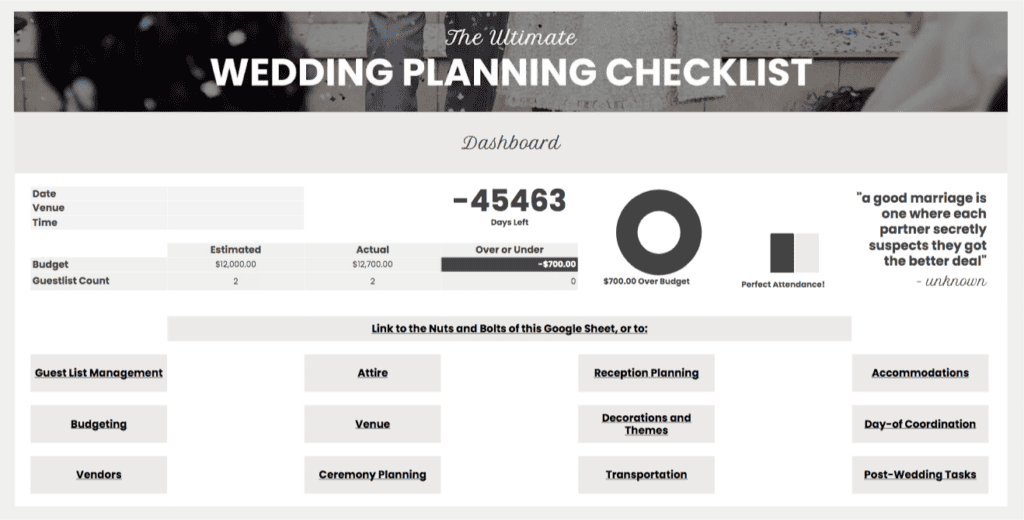
Wedding Planning Dashboard

How to Use the Spreadsheet Checklist

  1. Set the Date: Once you've saved a copy to your Google Sheets or Excel, enter your wedding date in cell D9 of the Dashboard tab. The "Days Left" countdown will update automatically.
  2. Venue & Time: Input your venue name and start time in cells D10 and D11 to centralize your event details.
  3. Manage Your Budget: Use the Budgeting tab to track expenses; your totals will automatically flow back to the main Dashboard.
  4. Guest List & RSVPs: Add your guests and their details. Counts for RSVPs and meal preferences will update in real-time.
  5. Customize: Use the "Nuts and Bolts" tab to define custom dietary restrictions, roles (e.g., Bridesmaid, Groomsman), and meal options.

Everything You Need in One Place

  • Budgeting: Keep track of every cent without the stress.
  • Guest List Management: Effortlessly manage RSVPs and meal preferences.
  • Venue & Vendors: Compare and select the best options for your big day.
  • Attire & Ceremony: Plan every detail of your look and the proceedings.
  • Logistics: Coordinate transportation and accommodations for you and your guests.

Bonus: Ultimate Honeymoon Planning Checklist

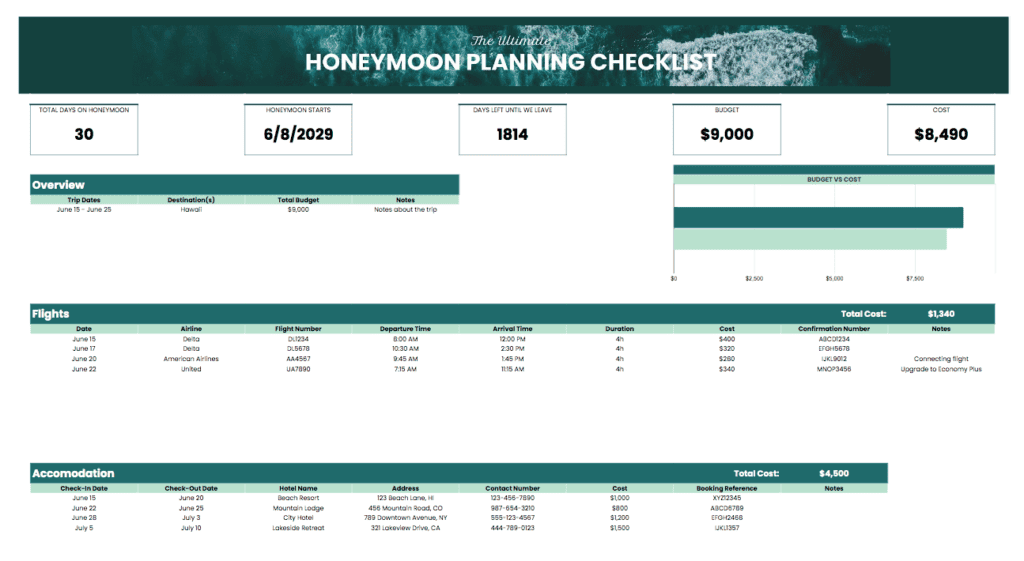
We haven't forgotten about the post-wedding getaway! Ensure your first trip as a married couple is just as smooth as your big day with our integrated honeymoon planning guide, also available for free download below.

For theme inspiration and visual ideas, we highly recommend checking out Pinterest/Weddings.

Key Features

Automated "Days Left" countdown timer based on your wedding date.
Dynamic budget and guest list trackers that update the main dashboard.
Customizable drop-down menus for dietary needs and guest roles.
Integrated vendor comparison and contact management sections.
Comprehensive honeymoon planning guide included.
Updates

The Ultimate Wedding Planning Checklist Updates

v1.1
  • Added the Ultimate Honeymoon Planning Checklist as a companion resource.
  • Updated Dashboard UI for better mobile viewing.
v1.0
  • Initial release of the Wedding Planning Spreadsheet.

Download The Ultimate Wedding Planning Checklist

Download The Ultimate Honeymoon Planning Checklist

Frequently Asked Questions

What exactly is included in this wedding planning checklist?

This is an all-in-one spreadsheet that covers every major wedding milestone. It includes dedicated sections for budgeting, guest list and RSVP management, vendor comparisons, attire and ceremony planning, and even a post-wedding task list to ensure nothing falls through the cracks.

How does the automated dashboard work?

The dashboard acts as your mission control. Once you enter your wedding date, it automatically calculates a "Days Left" countdown. Additionally, as you update your guest list and expenses in their respective tabs, the dashboard pulls that data forward to show your current budget status and RSVP counts in real time.

Can I use this template on my mobile phone while I'm visiting venues?

Absolutely! If you use the Google Sheets version, you can access and update your checklist directly from the Google Sheets app on your smartphone or tablet. This makes it easy to check off tasks or log vendor notes while you're on the go.

Is it possible to customize the guest roles and meal options?

Yes, we’ve included a "Nuts and Bolts" tab specifically for customization. You can edit the dropdown menus for guest roles (like "Flower Girl" or "Officiant"), dietary restrictions, and meal choices here, and those changes will automatically appear as options in your main Guest List tab.

Do I need to be a spreadsheet expert to use this?

Not at all. We designed the template to be intuitive and user-friendly, with clearly labeled cells and automated formulas that do the heavy lifting for you. All you need to do is enter your specific details into the light blue fields, and the sheet handles the math and organization.

Does this resource include any help with honeymoon planning?

Yes! We’ve included an integrated honeymoon planning guide to help you transition from your big day to your first romantic getaway. It’s a separate but complementary checklist within the resource that ensures your travel logistics are just as organized as your ceremony.

Is there a cost or a license required to use this template?

This wedding planning checklist is completely free to download and use for your personal planning. You are welcome to save a copy to your own drive and share it with your partner, family, or wedding party to help coordinate the planning process.

Leave a Reply

Your email address will not be published. Required fields are marked *